Case study
Digital restaurant menu with admin dashboard: what restaurants actually need — One Chickens case study
Manal ElhaririLast updated: 12 min read
When a guest picks up a phone at the table, they are rarely hunting for “nice design” alone. They want a fast answer: What do you serve? How much is it? What is the difference between one dish and another?
That is why restaurant and café owners across the Gulf keep asking the same question: is a paper menu—or a PDF photo on WhatsApp—still enough, or is it time for a digital menu that opens on a phone with clear dishes and prices?
This article answers from two angles: a practical buying guide for restaurant owners, and a real project NakhilCode built for One Chickens (واحد دجاج). The project combines a responsive guest-facing menu with an admin dashboard so the restaurant can update content without calling a developer for every routine change. We separate what is actually built from options that can be scoped later—without invented sales figures, fake testimonials, or promised Google rankings.
The day-to-day problem restaurants are trying to solve
In dining rooms from Riyadh and Jeddah to Dubai, Abu Dhabi, Kuwait City, Doha, Manama, and Muscat, the phone is part of hospitality. Guests open a link or scan a code, read the menu in Arabic—and sometimes English—then order from a waiter or through the restaurant’s own channel.
Paper menus still work in many places, but they get expensive to operate when prices change, items sell out, or seasonal offers appear. A WhatsApp PDF arrives quickly, yet it rarely behaves like a structured menu during a busy service—and someone usually has to redesign or resend it.
A useful digital menu reduces that operational friction:
- Categories and dishes arranged for scanning, not one endless scroll of text.
- Prices shown in the currency guests expect in that market.
- A featured dish highlighted without reprinting the whole menu.
- A layout that stays readable on a small phone screen.
- When an admin dashboard is included, staff can update prices, photos, and items themselves.
The real decision is not only “go digital.” It is scope: display-only menu? Search and categories? Cart plus WhatsApp order? Content admin for the team? That is where a subscription QR platform and a custom build diverge.
The One Chickens project: guest menu plus restaurant admin
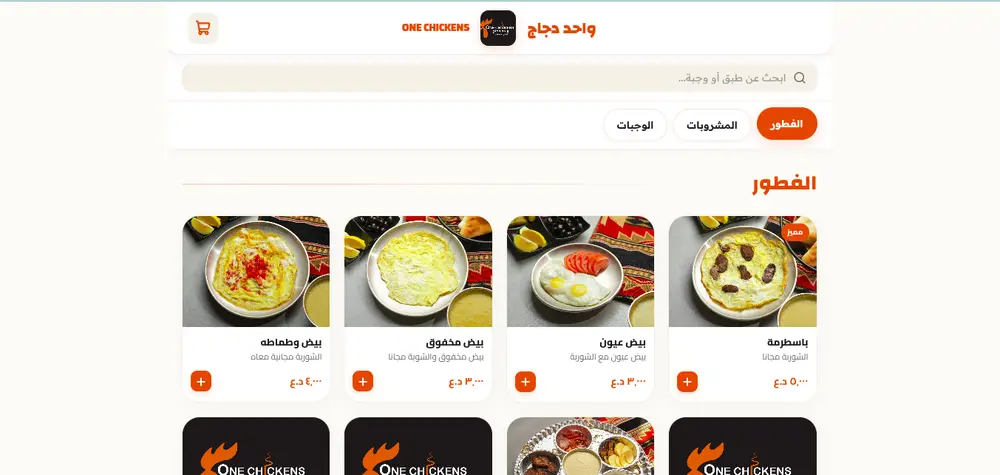
One Chickens (واحد دجاج) is an interactive digital restaurant menu in NakhilCode’s portfolio. This article relies on the published portfolio description, the official portfolio screenshot, and the project’s own admin and order-flow implementation. No public project URL is included until one is verified for publication.
Guest-facing menu
Based on the portfolio copy and screenshot, guests can:
- Browse food categories through clear tabs.
- Explore products with photos, titles, and short descriptions.
- View prices in Iraqi dinar (IQD / د.ع).
- Search within the menu.
- See featured-item highlighting.
- Add items to a cart and complete a structured WhatsApp order message when they check out.
- Use a responsive interface on phones and larger screens.
Admin dashboard (part of this project)
One Chickens includes a login-protected admin area for restaurant staff—not merely an optional idea for other clients. From that dashboard, the restaurant can:
- Manage products: create, edit, and delete items, including name, description, price, image, category, availability, featured flag, and sort order.
- Manage categories: create, edit, and delete sections (with protection against deleting a category that still has products), toggle active state, sort sections, and attach a category image when needed.
- Update prices: change a product price directly in the product form without rebuilding the guest UI.
- Manage product and category images: upload images through the admin uploader when storage is configured, or attach an allowed image URL, with cleanup of unused images after replace or delete.
- Product options: manage option groups and add-ons per product (required or optional) with their own prices and availability.
- Manage branches: create, edit, and delete branches with name, address, WhatsApp number, active state, and sort order.
- Account settings: change the admin password from the settings screen.
- Dashboard summary: view live counts from the database (products, available/unavailable, categories, branches, featured items).
Guest orders are prepared as WhatsApp messages; the system does not currently store completed orders inside the admin dashboard.
What we do not claim about this project
- No verified public visit URL in this article.
- No completed payment gateway, third-party delivery integration, or in-dashboard order history.
- No public admin screenshots in this article until safe, credential-free images are approved.
- No sales results, customer testimonials, or undocumented performance metrics.
Why the admin dashboard matters for restaurant owners
The guest menu answers the diner’s question. The admin dashboard answers the operations question: who updates the menu when a price changes today, an item sells out, or a seasonal dish is added?
In One Chickens, authorized staff can handle routine updates themselves after signing in:
- Change a dish price in minutes instead of waiting for a developer or redesigning a PDF.
- Mark an item unavailable temporarily without rebuilding the whole menu.
- Add a category or product with its photo, description, and order.
- Maintain multiple branches with different WhatsApp numbers or addresses when needed.
That does not remove the need for a developer on larger expansions or new features—but it reduces day-to-day dependence on engineering for ordinary content changes. Practically: guests get a clear mobile menu, and the restaurant keeps direct control of the catalog.
What this means for a restaurant owner in the GCC
The practical questions are similar whether you operate in Saudi Arabia, the UAE, Kuwait, Qatar, Bahrain, or Oman:
- Do you need display-only, or also a WhatsApp order path?
- Who updates prices and items every week?
- Do currency and language match your guests?
- Do you want a tighter brand fit, or is a standard subscription template enough?
One Chickens is a useful model: interactive guest menu + content admin + WhatsApp order flow. This project’s prices are set in Iraqi dinar; other restaurants would use their local market currency. NakhilCode works remotely with GCC restaurants without claiming local offices in every city.
Built in One Chickens vs later options
This split clarifies what belongs to this project and what can be discussed for other restaurants by scope.
Built in the One Chickens project
| Element | Reference |
|---|---|
| Responsive interactive digital menu | Portfolio + guest UI |
| Categories, search, featured badges | Portfolio screenshot + code |
| Prices in Iraqi dinar (IQD) | Guest UI + project pricing logic |
| Cart / add controls and WhatsApp order message | Guest checkout flow in code |
| Login-protected admin dashboard | Admin module in the project |
| Create / edit / delete products and categories | Admin dashboard |
| Price, image, and availability updates | Admin dashboard |
| Product option groups and add-ons | Admin dashboard |
| Branch management (name, address, WhatsApp, status) | Admin dashboard |
| Admin password change | Admin settings |
Options for other restaurants or later phases
- Print-ready table QR codes.
- A full English experience alongside Arabic for mixed audiences.
- Broader in-dashboard restaurant profile screens (for example wider brand or delivery-fee editing UI).
- Payment gateways, delivery integrations, or an internal order ledger—only when scoped explicitly.
When you ask for a quote, ask for a written phase-one list and a clear “optional later” list.
Custom menu vs subscription QR SaaS
Subscription QR platforms fit when you want a fast launch with a standard scope. A custom build fits when you want tighter branding, a specific flow (such as WhatsApp), and an admin area shaped around how your team works.
One Chickens is an example of the second path: guest UI + content admin + WhatsApp ordering—without claiming it beats every subscription product in every case. The right choice depends on menu size, update speed, budget, and who owns content day to day.
Pricing without mixing package scopes
On the NakhilCode website, the business website package starts at USD 250, and the e-commerce package starts at USD 550 (see the packages and pricing table). Those are starting prices for the package scopes listed on the site.
An interactive restaurant menu with an admin dashboard, search, categories, cart, and WhatsApp ordering—or any broader restaurant system—should not be assumed to sit inside the USD 250 or USD 550 packages automatically. Those packages are reference points for other website types. A menu project is quoted after menu size, languages, admin needs, and display-versus-order requirements are clear.
What usually moves the price:
- Menu size and readiness of photos and copy.
- One language versus more than one.
- Admin dashboard scope (products, categories, branches, options…).
- Any order path, notifications, or integrations.
- Hosting and support after launch.
How NakhilCode can build a similar solution
- Clarify guest scope: display-only, or cart plus WhatsApp order?
- Define starting content: categories, products, photos, currency, language.
- Build the agreed guest UI and admin dashboard.
- Review on mobile with the restaurant team before launch.
For a broader website-versus-social decision, see Does your business need a website in 2026? For common UX pitfalls after launch, see 10 mistakes that kill your website.
What to do next
If you are planning a digital menu, send a short brief: approximate number of categories, display-only versus cart-style UI needs, whether you want a content admin dashboard, currency, and language. Use Contact to request a consultation or an initial concept for your scope.
You can also review the portfolio and service packages for starting points—without any obligation.
FAQ
I already have strong Instagram. Do I still need a digital menu?
Instagram is excellent for reach and stories. It is not always the best place for a full, structured price list during service. A digital menu complements social presence; it does not have to replace marketing.
Is a subscription QR menu enough?
Sometimes yes—if your needs are standard and you prefer a ready-made plan. If you want tighter brand control, a content admin dashboard, or a custom WhatsApp flow, discuss a written custom scope first.
What does the One Chickens admin dashboard do?
Authorized staff can manage products, categories, prices, images, product options, and branches, see summary counts, and change the admin password. Guest orders are prepared via WhatsApp and are not currently stored as an in-dashboard order ledger.
Why does One Chickens show prices in Iraqi dinar?
Because the project’s guest interface and pricing logic display Iraqi dinar (IQD / د.ع). Other projects use the restaurant’s local market currency.
How much does a custom digital menu with admin cost?
It depends on scope. The USD 250 and USD 550 starting figures refer to standard website and store packages on the site; they do not automatically include an interactive restaurant menu with an admin dashboard. After requirements are clear, you receive a matching quote.
Do you work with restaurants in all six GCC countries?
Yes. We can work remotely with restaurants and cafés in Saudi Arabia, the UAE, Kuwait, Qatar, Bahrain, and Oman. Clear communication and ready menu content matter more than the developer’s city.
Related posts
Business
Does Your Business Need a Website in 2026, or Are Instagram and WhatsApp Enough?
A practical GCC guide for business owners: when Instagram and WhatsApp are enough, and when a website becomes a clear, organized reference — without hype.
Website quality
10 Fatal Mistakes That Kill Your Website | Professional Guide 2026
Discover 10 critical mistakes destroying your website with practical solutions from NakhilCode to improve your site with care.
Pricing
How Much Does a Website Cost in Morocco 2026? Quality & Price Guide
A complete guide to web development pricing and quality in Morocco 2026. Discover the real value for landing pages, business sites, and e-commerce.